
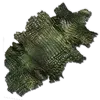
Dermis
Preserves creature appearance. Display on Taxidermy.
Details
- Category
- Resource
- Games
- ASE + ASA
- Expansion
- Extinction
Video guides: search YouTube for Dermis guides
Dermis — Detailed Guide
Keeping a creature on display
A Dermis stores the look of a creature so it can be shown on a  Taxidermy Base. It exists in ARK: Survival Evolved and ARK: Survival Ascended, and the ARK Wiki ties it to Extinction, with Lost Island, Genesis: Part 1 and Genesis: Part 2 also listed. The wiki's item text asks players to put it on a Taxidermy Base for display. The version that added it is 285.104.
Collecting a Dermis
Strike a creature with a  Taxidermy Tool to take its Dermis. That works on a tamed creature owned by the harvesting survivor's own tribe, or on a corpse that can be harvested. The Dermis copies three things from the creature as it was when struck: its colors, its name and its level. Colors that come from a
 Dino Candy effect are not kept.
How often it can be taken
- A player can normally collect one Dermis per creature, alive or dead. If a tame dies after its Dermis was taken while it lived, a second one can be collected from the body.
- Newborns are an exception: one Dermis can be taken at each stage, Baby, Juvenile, Adolescent and Adult, up to four in total. The tool may kill a baby with very low health in one strike, so care is needed.
- A
 Cryopod also allows repeated harvests, and the wiki notes that on console a creature can be harvested again after some waiting.
Bosses and hard cases
Some creatures cannot normally give a Dermis because the corpse disappears at once or cannot be reached, unless the creature has been force tamed; the wiki names the  King Titan and the
 Overseer, including its transformed state. An Overseer Dermis is possible with precise timing: dismount just before the boss dies and strike the spot where it fell as its death animation begins. It is visible only to players who entered the Tek Cave in that same session. The same trick works on the
 Defense Units and the
 Attack Drone, the drone being the hardest of the three. These three keep no coloring and look identical whatever difficulty they came from.
Moving and storing a Dermis
When the creature cannot be tamed, its Dermis shows up only on the map that creature comes from; a Broodmother Dermis, for example, stays blank on Aberration or Ragnarok. Moving a boss Dermis to another map wipes it, and bringing it back does not repair it; the wiki adds that a transfer to any map destroys it, even one with the same boss fight, though some Dermis keep their look after a transfer. Placing one in a  Tek Dedicated Storage turns it into a blank Dermis. It weighs 0.5 and has a stack size of 1.