
Overview
· Discord botThe DodoReaper Discord bot is part of DodoReaper HQ and runs inside it on your machine. Its status shows how many players are online.
What it does
- Server commands for admins: list servers, broadcast, restart, RCON, loot boxes and player actions. See Server commands.
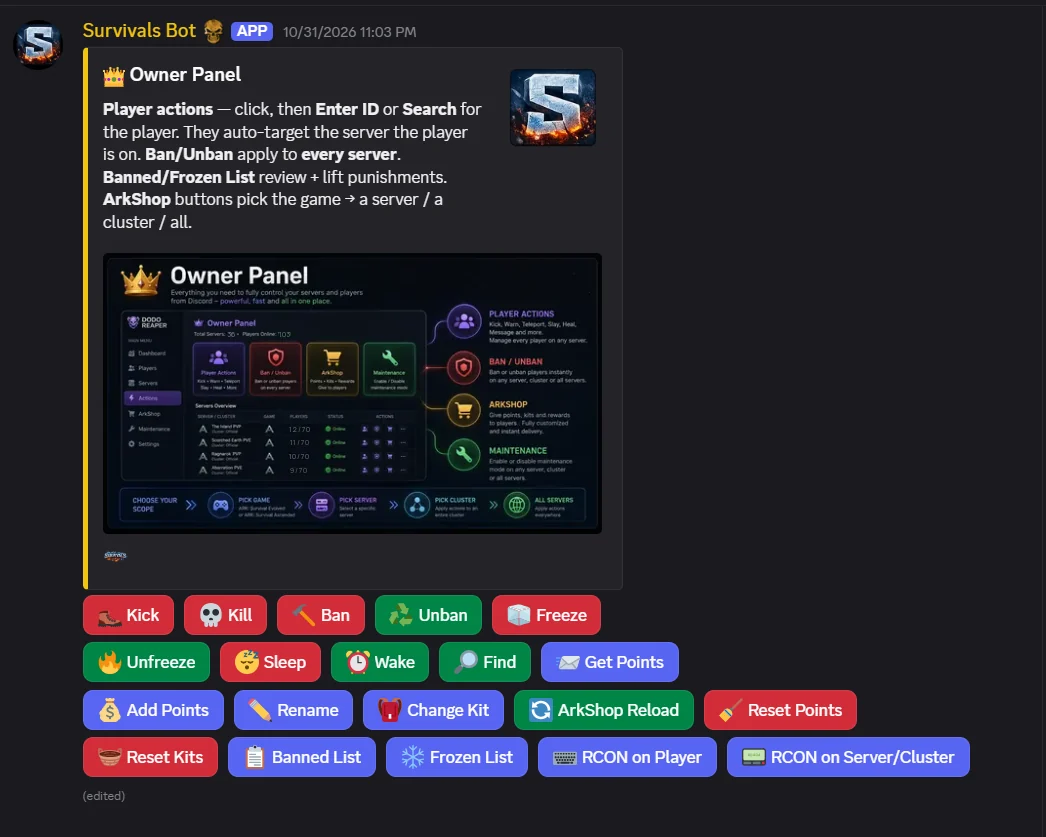
- Panels: messages with buttons that the bot posts for linking accounts, daily rewards, verification, the live players list, tickets, voice rooms and the admin, supervisor and owner panels. See Panels.
- Player commands: stats, shop points, the tribe log, suggestions and invites. See Player commands.
- Community and events: giveaways, auctions, suggestions, invite tracking, stats channels, your servers' chat and vote rewards. See Community and events.
- Moderation: warnings, timeouts, kicks, bans and purges, each recorded as a case. See Moderation.
- Tickets and voice rooms. See Tickets and voice rooms.
Some player commands need a linked account: the player links their game account to Discord first. Player features the owner has switched off answer that they are turned off.
About the pictures
They come from the Survivals community's Discord, which runs this bot. Members', players' and tribe names are blurred.
Where it is set up
The bot's token, its features, account linking, panels, leaderboards, staff roles and alerts are set on the Discord pages of the hosting dashboard. DodoReaper HQ runs the bot with those settings.